
Connect your systems. Unlock your potential.
One connector to integrate Acomba, Avantage, Sage 50, QuickBooks and many more.
A robust, unified platform that connects your accounting software to web apps, automation tools, SQL Server, Excel and Power BI — without learning their SDKs. Built and supported in Quebec, Canada.
Try it free · a specialist answers you
The accounting and business software we connect
Sage 50Sage 300QuickBooks OnlineAcombaGo
What do you want to do?
You have a challenge. We have the solution.
02
Automate a process
An incoming invoice becomes an accounting entry — document management, OCR, RPA.
For developers
Learn one API. Not four SDKs.
Acomba, Avantage, Sage, QuickBooks → Conexio → one uniform interface. You build your application; we handle talking to the accounting software.
GET https://gateway.conexio.dev/api/Entity/Customer
    ?$select=NoClient,NomClient,SiteWeb
    &$filter=NoClient in (’29683560’,’29683561’)

Authorization: Basic base64(LicenceCode:APIKey)
COMPANY_CODE: YOUR_COMPANY
200 OK
[
  { "NoClient": "29683560", "NomClient": "Quincaillerie Démo", "SiteWeb": "www.quincaillerie-demo.example" },
  { "NoClient": "29683561", "NomClient": "Atelier Démo", "SiteWeb": "www.atelier-demo.example" }
]
Same request, same response — whether the company runs Acomba, Avantage, Sage 50 or QuickBooks.
$select and $filter work right in the URL.
Pick your fields and filter server-side, without pulling everything back to sort it afterwards.
Real-world cases
They already do exactly what you are trying to do.
Document management / OCR
The supplier invoice is recognized, the supplier validated, the entry created in the accounting software.
B2B portal
Customers, products, inventory and invoices synced both ways.
Automated sync
A PSA or a machine-shop business app and the accounting, aligned on a schedule, with a log.
Power BI dashboard
SyncEngine replicates into SQL Server; the dashboard refreshes itself.
Multi-company consolidation
Several companies, a single Excel workbook with Solution IES.
Ready for AI assistants
Two MCP servers: one to code, one to act in all your systems.
Claude, ChatGPT, Cursor: your assistant writes the API calls, or reads and acts in Acomba, Autotask, Servicentre and the rest.
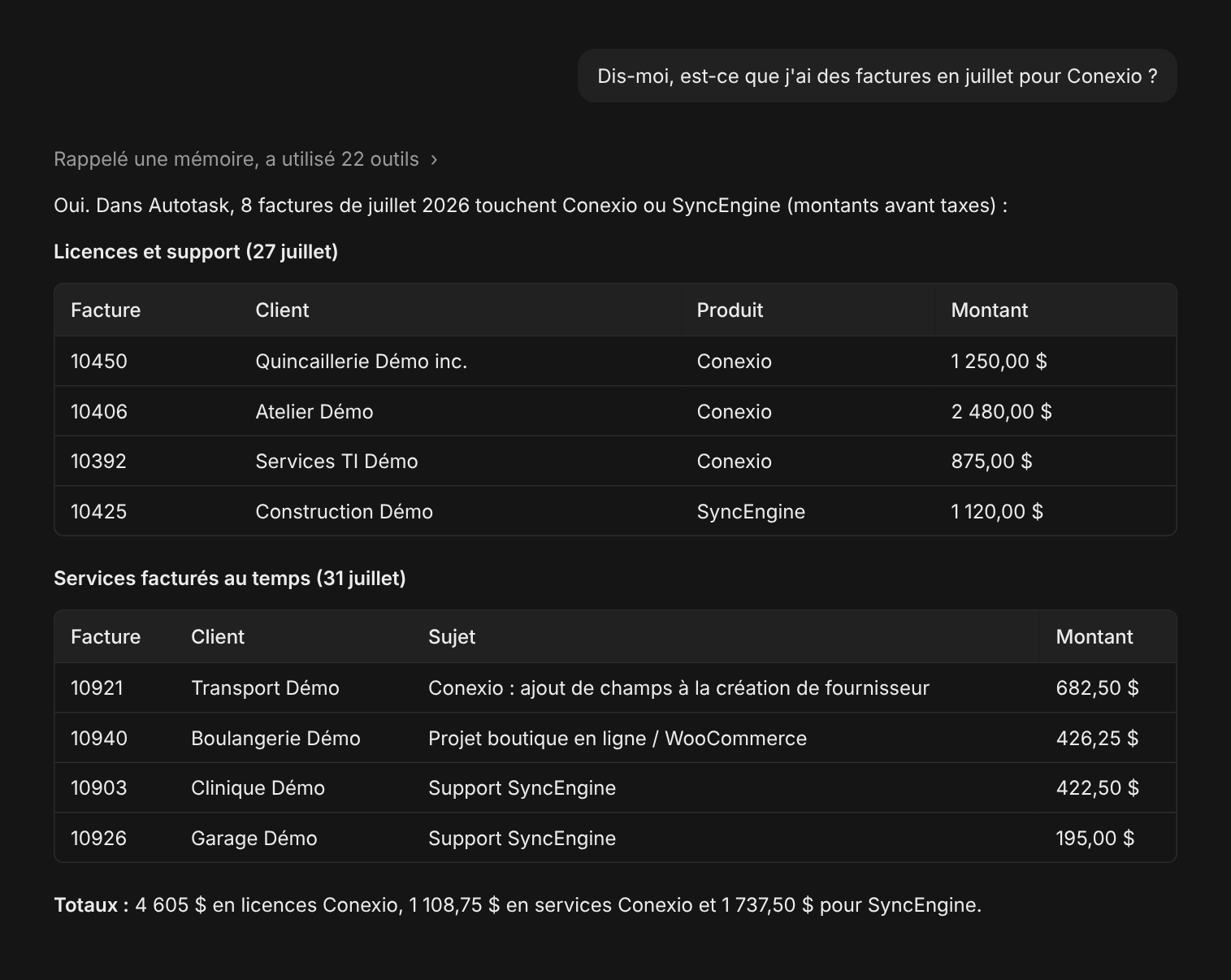
Example, fictitious data.
Who it’s for
Built for those who connect software and those who use it.
Automation and document management
Don’t lose a project because your client uses Acomba.
Custom application developers
You built the application; don’t build Acomba on top of it.
Software vendors
Add Acomba and Avantage to your software without becoming an expert.
Accountants and firms
Your financial statements in Excel, consolidated, fed by your accounting software.
Finance leaders and BI
Free the data locked in your accounting software.
SMBs and MSPs
Keep the software that works. Make it talk.
Partners and integrators
Your client uses one of the supported packages? You can still sell your project.
You sell and deliver business software — portals, automation, document management, CRM. We provide the connection to the accounting software, the installation at the client, support and documentation. You keep the relationship — and come back with the next one.
How it works
Your app → the platform → the local Agent if needed → the accounting software.
01 — THE HUB
The HUB receives your calls
A REST entry point at gateway.conexio.dev. It receives your calls, relays and logs them — and does not keep their content.
02 — THE AGENT
The Agent does the work at the client
On the PC or server that runs the accounting software. It connects out over HTTPS to the HUB, never the other way: no inbound port to open.
03 — THE CLOUD
QuickBooks Online and Acomba GO: the Agent runs online
These products are already in the cloud: the Agent runs online, on our side, an authorization from the client’s account is enough, and the connection appears in the portal.
Why not build it yourself?
Your competitive edge is your software. Not your Acomba connector.
The SDK is only the beginning: install at every client, manage versions, secure, monitor, troubleshoot, keep up with the vendor’s changes — then start over for the next one.
Conexio turns that technical debt into a service.
Proof
Already in production, not in a slide deck.
Conexio has run real integrations since 2015, first under the names OnlineERP and CloudBI. Here is what goes through the HUB.
2015
first Acomba integration in production
6 M+
calls processed since 2015
300+
companies connected today
×100 k
hundreds of thousands of calls every month
GED → HUB → Acomba
Document management that writes into the accounting
The supplier invoice is captured, the supplier and account recognized, the entry created in Acomba — then the payment status sent back.
ProShop → HUB → Acomba
A machine shop plugs its production into its accounting
ProShop purchase orders and invoices land in Acomba through SyncEngine, with no one retyping them.
Excel / IES → HUB → Acomba ×8
Eight Acomba companies, one workbook
A multi-company group reads its consolidated sales and receivables without exporting eight times.
Security and data
Your data, your peace of mind.
What flows between your application and your accounting software, and nothing more.
- No inbound port at the clientThe Agent connects to the HUB over outbound HTTPS. Nothing to open in the firewall, nothing exposed to the Internet.
- Nothing is stored at the HUBCall content travels encrypted and is not stored; only the log — who, when, which entity, which result — is kept.
- One revocable key per integratorEach partner has its own keys, with its own usage cap. Revoke one key without touching the others.
- Hosted in Canada, supported in QuebecInfrastructure and team at Solution Infomédia. Someone who knows your accounting software answers you.
Ready to connect your systems?
One account, one agent, one API key. Test it this afternoon.
Or we do it with you: a Solution Infomédia specialist calls you, looks at your setup and tells you frankly whether Conexio is the right piece.